Showing posts with label miscellaneous. Show all posts

Sunday, September 22, 2024

Two new Zotero tricks

 Long time no post! Here are two recent Zotero tricks

Extracting references from a document (and copying to clipboard)

And merging duplicates:

```

var DupPane = Zotero.getZoteroPanes();
for(var i = 0; i < 100; i++) {
await new Promise(r => setTimeout(r, 1000));
DupPane[0].mergeSelectedItems();
Zotero_Duplicates_Pane.merge();
}

```

Wednesday, January 4, 2023

Bluetooth keyboard not working

 https://support.lenovo.com/us/en/solutions/ht101285-24g-wireless-keyboardmouse-function-may-be-interrupted-when-plugging-into-usb-30-port-of-thinkpad-usb-30-dock-or-thinkpad-usb-30-basic-dock


happens all the time


Monday, August 22, 2022

Being a good mentor

 Re-post of: https://sarkarlab.ucsf.edu/new-blog/2022/2/28/the-best-policy


The Best Policy
Urmimala Sarkar - March 1, 2022
Dear friends,
It’s March 2022, and I can’t say whether time moves quickly or slowly any more. The state of our world is hitting me hard right now, and I am sending solidarity to all who share this feeling. I spoke to a small group of mid-career faculty recently, and they followed up after the meeting with the following question: “We suggest a future blog post on techniques and strategies for supporting excellence on research teams. 
Combine high expectations with specific feedback.
Be forthcoming with your team about the bigger picture. 
Own your mistakes. 
 be kind to yourself. 
Warmly,
Urmimala

Monday, May 23, 2022

Fixing your ergonomic keyboard

 https://answers.microsoft.com/en-us/windows/forum/all/microsoft-sculpt-keyboard-need-to-clean-under-the/d447045d-da56-4ff1-beea-cb5ab9c02873

I used a paper clip, and this worked well


Tuesday, September 28, 2021

Windows CMD tricks

A growing list of Windows CMD tricks

  •  `del /S *.jpg` recursively deletes all jpg in all subfolders of your current location
  • https://www.ghacks.net/2017/07/18/how-to-delete-large-folders-in-windows-super-fast/#:~:text=Tap%20on%20the%20Windows%2Dkey,F%2FQ%2FS%20*.
  • https://stackoverflow.com/questions/25554254/batch-command-to-delete-all-subfolders-with-a-specific-name


External monitor not recognized?

If your external monitor is plugged in but not being recognized (and you know all the cords work), try this

https://winaero.com/clear-reset-external-display-cache-windows-10/ (pasted below)


Also, try to update your computers drivers, via the built-in systems (eg Lenovo Vantage)


To Clear and Reset External Display Cache in Windows 10,

  1. Open the Registry Editor app.
  2. Go to the following Registry key: HKEY_LOCAL_MACHINE\SYSTEM\CurrentControlSet\Control\GraphicsDrivers\
    See how to go to a Registry key with one click.
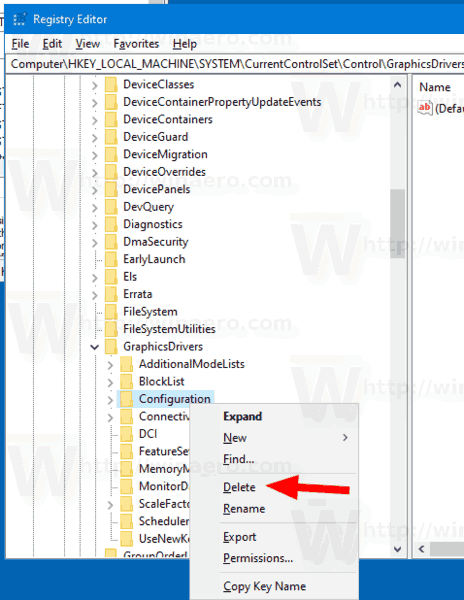
  3. Right-click on the subkey Configuration and select Delete from the context menu.Windows 10 Clear Reset Display Cache
  4. Now, delete two other subkeys, Connectivity and ScaleFactors.
  5. Restart Windows 10 to make the changes done by the Registry tweak take effect.

Monday, April 27, 2020

General MS Word tricks

For keeping your tables on one page together: https://word.tips.net/T000864_Keeping_Tables_on_One_Page.html

Find and replace with formatted text: copy what you want to the clipboard, then in the find-replace window, put ^c in the replace with

Fixing a Lenovo startup error

I was having this weird Lenovo on startup where it would say DLL is missing, but this link helped

https://social.technet.microsoft.com/Forums/en-US/369abec0-e46c-4538-b756-e2d391a5d704/there-was-a-problem-starting-c-program?forum=win10itprosetup